LZW stands for the brilliant guys who invented this file compression algorithm. If you goole, you will be able to find lots of articles and lecture notes about LZW format. It is a little difficult to figure out the details, but since it’s such a important algorithm, it’s worth to study about it.
The short description of LZW is that, when this LZW thing compresses an original file, it generates a kind of look-up table, and it stores the index of the look-up table. However, LZW encoder doesn’t save the look-up table itself – in only saves the index data (which is now the compressed data) that refer to the table. With clever thought, when the LZW decoder reads the index data, it can regenerate the look-up table while decompressing the data.
There’s one thing to note though. After decoding the Ultima IV’s LZW compressed pictures, the resulting data becomes the Raw data. For some reason, I thought the uncompressed data should be RLE data, and so I wasted hours before I realize it was not RLE data but Raw data.
For the look-up table, LZW algorithm uses hash table. You can google about hash table, and you can study about it if you really want, and actually I do encourage you to do that, but studying hash table doesn’t guide you anywhere when we talk about Ultima IV format. Why? Because Ultima IV uses a very unique and peculiar kind of hash table. Among others, Marc Winterrowd is the guy who figured out Ultima IV’s LZW algorithm. Even the xu4 project uses his code directly. I’m not 100% sure, but I think he dived into the source code, if not the compiled executalble file itself. Otherwise, it won’t be possible to reverse engineer the algorithm – it is so much strange algorithm the Origin Systems (the company that made Ultima IV) used.
Anyway, this is the end of the post. No python code today, because Ultima IV’s LZW is, again, way too complicated to explain with a few words.
Ultima IV internal formats fall into three catagories: Raw, RLE, and LZW. Those formats are thoroughly investigate by many hackers and presented on internet, and ultima codex wiki is one of them. I also got help from the site, and so there aren’t many things for me to tell, but I do have something to comment on.
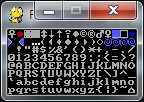
Raw format is very basic one. It’s uncompressed format, and it has just color information from the first pixel to the last pixel, in specific order. If you know the width and the height of the original picture, you can draw the picture on your canvas. You need to do some experiments maybe, but it’s not too hard to do.
import pygame
from pygame.locals import *

EGA2RGB = [
    (0x00, 0x00, 0x00),  # BLACK
    (0x00, 0x00, 0xAA),  # NAVYBLUE
    (0x00, 0xAA, 0x00),  # GREEN
    (0x00, 0xAA, 0xAA),  # TEAL
    (0xAA, 0x00, 0x00),  # MAROON
    (0xAA, 0x00, 0xAA),  # MAGENTA
    (0xAA, 0x55, 0x00),  # BROWN
    (0xAA, 0xAA, 0xAA),  # SILVER
    (0x55, 0x55, 0x55),  # MATTERHORN
    (0x55, 0x55, 0xFF),  # BLUE
    (0x55, 0xFF, 0x55),  # LIGHT GREEN
    (0x55, 0xFF, 0xFF),  # AQUA
    (0xFF, 0x55, 0x55),  # SUNSET ORANGE
    (0xFF, 0x55, 0xFF),  # FUCHSIA
    (0xFF, 0xFF, 0x55),  # YELLOW
    (0xFF, 0xFF, 0xFF),  # WHITE
]

def raw(decompressed):
    if decompressed == None:
        return None

    pixels = []
    for d in decompressed:
        a, b = divmod(d, 16)
        pixels.append(EGA2RGB[a])
        pixels.append(EGA2RGB[b])

    return pixels


if __name__ == '__main__':
    pygame.init()

    displaysurf = pygame.display.set_mode((128, 64))
    pygame.display.set_caption('File Formats')

    with open("../ULTIMA4/CHARSET.EGA", "rb") as file:
        bytes = file.read()

    pixels = raw(bytes)
    pixObj = pygame.PixelArray(displaysurf)
    for i in range(16):
        for j in range(8):
            for k in range(8):
                for l in range(8):
                    pixObj[i * 8 + k][j * 8 + l] = pixels[i * 64 + j * 64 * 16 + k + l * 8]
    del pixObj

    loop = True
    while loop:

        for event in pygame.event.get():
            if event.type == QUIT:
                loop = False
                break

        pygame.display.update()

    pygame.quit()
Raw Format
Selecting a featured image is recommended for an optimal user experience
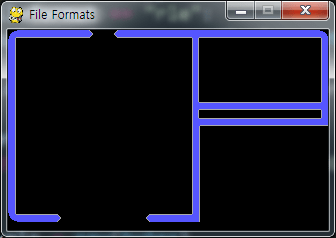
RLE format, or Run-Length Encoding format uses a simple and easy-to-understand compress algorithm. There are many variants in RLE format: some of them are simple and not too effective, and some of them are very sophisticated and carefully designed for the compress performance. Ultima IV’s RLE version is, I would say, the simpler one. It doesn’t give you very high compression ratio, especially when your picture is complicated, but if your original image uses single pixel color reapeatedly and continually, the compression ratio can be very good.
Ultima IV’s RLE starts from “normal mode”, and the normal mode is just like the raw format. But if you encounter the magic number 0x02, your state becomes “run-length mode”. The number after 0x02 tells you the repeat number, and the 3rd number tells you the color pixel value you should repeat. After the Run-Length Encoding, the state goes back to the “normal mode”.
.....

STATE_NORMAL        = 0
STATE_GET_RUNLENGTH = 1
STATE_GET_RUNCOLOR  = 2

def rle(bytes):
    pixels = []
    state = STATE_NORMAL
    for d in bytes:
        if state == STATE_NORMAL:
            if d == 0x02:
                state = STATE_GET_RUNLENGTH
            else:
                a, b = divmod(d, 16)
                pixels.append(EGA2RGB[a])
                pixels.append(EGA2RGB[b])
        elif state == STATE_GET_RUNLENGTH:
            run = d
            state = STATE_GET_RUNCOLOR
        elif state == STATE_GET_RUNCOLOR:
            for i in range(run):
                a, b = divmod(d, 16)
                pixels.append(EGA2RGB[a])
                pixels.append(EGA2RGB[b])
            state = STATE_NORMAL
    return pixels

if __name__ == '__main__':
    pygame.init()
    displaysurf = pygame.display.set_mode((320, 200))
    pygame.display.set_caption('File Formats')
    with open("../ULTIMA4/START.EGA", "rb") as file:
        bytes = file.read()

    pixels = rle(bytes)
    pixObj = pygame.PixelArray(displaysurf)
    for i in range(320):
        for j in range(200):
            pixObj[i][j] = pixels[i + j * 320]
    del pixObj

    loop = True
    while loop:

        for event in pygame.event.get():
            if event.type == QUIT:
                loop = False
                break

        pygame.display.update()

    pygame.quit()
RLE Format
Please note that the above codes are NOT my own. It is actually James Tauber‘s work, and I borrowed his code almost without any modification.
The post is getting longer, so I will describe about the LZW format in the next post.
The next thing I always wondered about the intro sequence of Ulitma IV was the appearing of the logo “Ultima IV”. To me it looked kind of unique, and I didn’t think of the logic until very recently.
The closest algorithm I could think of was, ramdomize x and y coordinate and put a pixel there, and repeat.
# Radomized appearing of logo, a reproduction of Ultima IV's introductory sequence
# program by Dr. Roach (https://drroach.game.blog/), 2020-02-25

import pygame
import random

color = (128, 128, 255)
black = (0, 0, 0)

pygame.init()
pygame.display.set_caption("Logo Demo")

screen = pygame.display.set_mode((320, 200))
screen.fill(black)

font = pygame.font.SysFont("comicsansms", 54)
text = font.render("Dr. Roach", True, color)

w = text.get_width()
h = text.get_height()
x0 = 160 - w // 2
y0 = 80 - h // 2

clock = pygame.time.Clock()

running = True
while running:
	for event in pygame.event.get():
		if event.type == pygame.QUIT:
			running = False

	x = random.randint(0, w // 2) * 2
	y = random.randint(0, h)
	screen.blit(text, (x0 + x, y0 + y), (x, y, 2, 1))

	pygame.display.update()
	clock.tick(250)

pygame.quit()
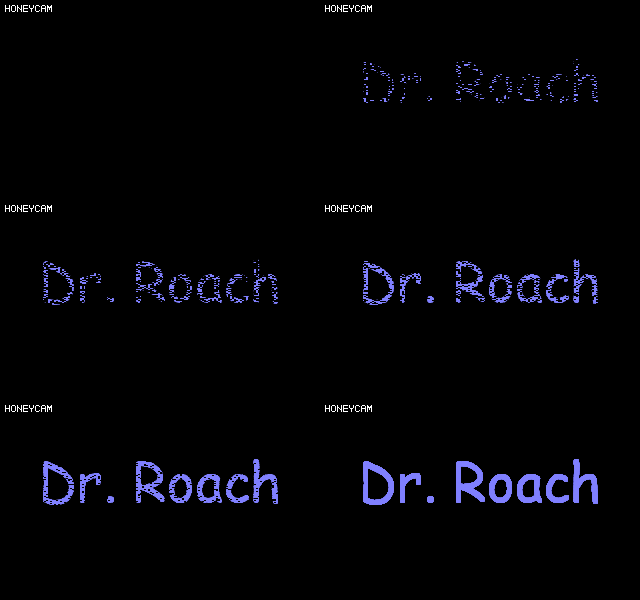
If you run the code above, it would show our logo in an randomized way. However, it’s very different from what we see in Ultima IV intro.
Then what? Well, it just came up in my mind all of a sudden, and the result was below.
# Radomized appearing of logo, a reproduction of Ultima IV's introductory sequence
# program by Dr. Roach (https://drroach.game.blog/), 2020-02-25

import pygame
import random

color = (128, 128, 255)
black = (0, 0, 0)

pygame.init()
pygame.display.set_caption("Logo Demo")

screen = pygame.display.set_mode((320, 200))
screen.fill(black)

font = pygame.font.SysFont("comicsansms", 54)
text = font.render("Dr. Roach", True, color)

w = text.get_width()
h = text.get_height()
x0 = 160 - w // 2
y0 = 80 - h // 2

clock = pygame.time.Clock()
r = 0.0

running = True
while running:
	for event in pygame.event.get():
		if event.type == pygame.QUIT:
			running = False

	for x in range(w // 2):
		for y in range(h):
			if random.random() < r:
				screen.blit(text, (x0 + x * 2, y0 + y), (x * 2, y, 2, 1))
			else:
				pygame.draw.line(screen, black, (x0 + x * 2, y0 + y), (x0 + x * 2 + 1, y0 + y))

	if r < 1.0:
		r += 0.0025

	pygame.display.update()
	clock.tick(50)

pygame.quit()
To explain the algorithm, it starts from a number you pick, and let’s call the number “r”. For each and every pixel of the logo, you roll a dice. If the resulting number is smaller than the number “r”, you draw the pixel. If the number on your dice is bigger than “r”, you draw backgrould color black for the pixel instead.
After you are done with all the pixels of the logo, repeat from the first pixel, except that now we increase the number “r” a little bit. As our “r” grows, the chance of showing the logo gets higher, and the chance of showing black backgound gets lower.
I hope my explanation is clear enough. To me, the result seems quite close to the Ultima IV’s logo appearing scene.

 Dr. Roach’s Game World Creation