
Ultima IV internal formats fall into three catagories: Raw, RLE, and LZW. Those formats are thoroughly investigate by many hackers and presented on internet, and ultima codex wiki is one of them. I also got help from the site, and so there aren’t many things for me to tell, but I do have something to comment on.
Raw format is very basic one. It’s uncompressed format, and it has just color information from the first pixel to the last pixel, in specific order. If you know the width and the height of the original picture, you can draw the picture on your canvas. You need to do some experiments maybe, but it’s not too hard to do.
import pygame
from pygame.locals import *

EGA2RGB = [
    (0x00, 0x00, 0x00),  # BLACK
    (0x00, 0x00, 0xAA),  # NAVYBLUE
    (0x00, 0xAA, 0x00),  # GREEN
    (0x00, 0xAA, 0xAA),  # TEAL
    (0xAA, 0x00, 0x00),  # MAROON
    (0xAA, 0x00, 0xAA),  # MAGENTA
    (0xAA, 0x55, 0x00),  # BROWN
    (0xAA, 0xAA, 0xAA),  # SILVER
    (0x55, 0x55, 0x55),  # MATTERHORN
    (0x55, 0x55, 0xFF),  # BLUE
    (0x55, 0xFF, 0x55),  # LIGHT GREEN
    (0x55, 0xFF, 0xFF),  # AQUA
    (0xFF, 0x55, 0x55),  # SUNSET ORANGE
    (0xFF, 0x55, 0xFF),  # FUCHSIA
    (0xFF, 0xFF, 0x55),  # YELLOW
    (0xFF, 0xFF, 0xFF),  # WHITE
]

def raw(decompressed):
    if decompressed == None:
        return None

    pixels = []
    for d in decompressed:
        a, b = divmod(d, 16)
        pixels.append(EGA2RGB[a])
        pixels.append(EGA2RGB[b])

    return pixels


if __name__ == '__main__':
    pygame.init()

    displaysurf = pygame.display.set_mode((128, 64))
    pygame.display.set_caption('File Formats')

    with open("../ULTIMA4/CHARSET.EGA", "rb") as file:
        bytes = file.read()

    pixels = raw(bytes)
    pixObj = pygame.PixelArray(displaysurf)
    for i in range(16):
        for j in range(8):
            for k in range(8):
                for l in range(8):
                    pixObj[i * 8 + k][j * 8 + l] = pixels[i * 64 + j * 64 * 16 + k + l * 8]
    del pixObj

    loop = True
    while loop:

        for event in pygame.event.get():
            if event.type == QUIT:
                loop = False
                break

        pygame.display.update()

    pygame.quit()
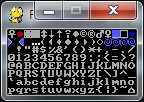
Selecting a featured image is recommended for an optimal user experience
RLE format, or Run-Length Encoding format uses a simple and easy-to-understand compress algorithm. There are many variants in RLE format: some of them are simple and not too effective, and some of them are very sophisticated and carefully designed for the compress performance. Ultima IV’s RLE version is, I would say, the simpler one. It doesn’t give you very high compression ratio, especially when your picture is complicated, but if your original image uses single pixel color reapeatedly and continually, the compression ratio can be very good.
Ultima IV’s RLE starts from “normal mode”, and the normal mode is just like the raw format. But if you encounter the magic number 0x02, your state becomes “run-length mode”. The number after 0x02 tells you the repeat number, and the 3rd number tells you the color pixel value you should repeat. After the Run-Length Encoding, the state goes back to the “normal mode”.
.....

STATE_NORMAL        = 0
STATE_GET_RUNLENGTH = 1
STATE_GET_RUNCOLOR  = 2

def rle(bytes):
    pixels = []
    state = STATE_NORMAL
    for d in bytes:
        if state == STATE_NORMAL:
            if d == 0x02:
                state = STATE_GET_RUNLENGTH
            else:
                a, b = divmod(d, 16)
                pixels.append(EGA2RGB[a])
                pixels.append(EGA2RGB[b])
        elif state == STATE_GET_RUNLENGTH:
            run = d
            state = STATE_GET_RUNCOLOR
        elif state == STATE_GET_RUNCOLOR:
            for i in range(run):
                a, b = divmod(d, 16)
                pixels.append(EGA2RGB[a])
                pixels.append(EGA2RGB[b])
            state = STATE_NORMAL
    return pixels

if __name__ == '__main__':
    pygame.init()
    displaysurf = pygame.display.set_mode((320, 200))
    pygame.display.set_caption('File Formats')
    with open("../ULTIMA4/START.EGA", "rb") as file:
        bytes = file.read()

    pixels = rle(bytes)
    pixObj = pygame.PixelArray(displaysurf)
    for i in range(320):
        for j in range(200):
            pixObj[i][j] = pixels[i + j * 320]
    del pixObj

    loop = True
    while loop:

        for event in pygame.event.get():
            if event.type == QUIT:
                loop = False
                break

        pygame.display.update()

    pygame.quit()
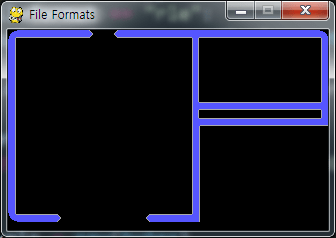
Please note that the above codes are NOT my own. It is actually James Tauber‘s work, and I borrowed his code almost without any modification.
The post is getting longer, so I will describe about the LZW format in the next post.
 Dr. Roach’s Game World Creation